

Add These Meetings to Your Calendar
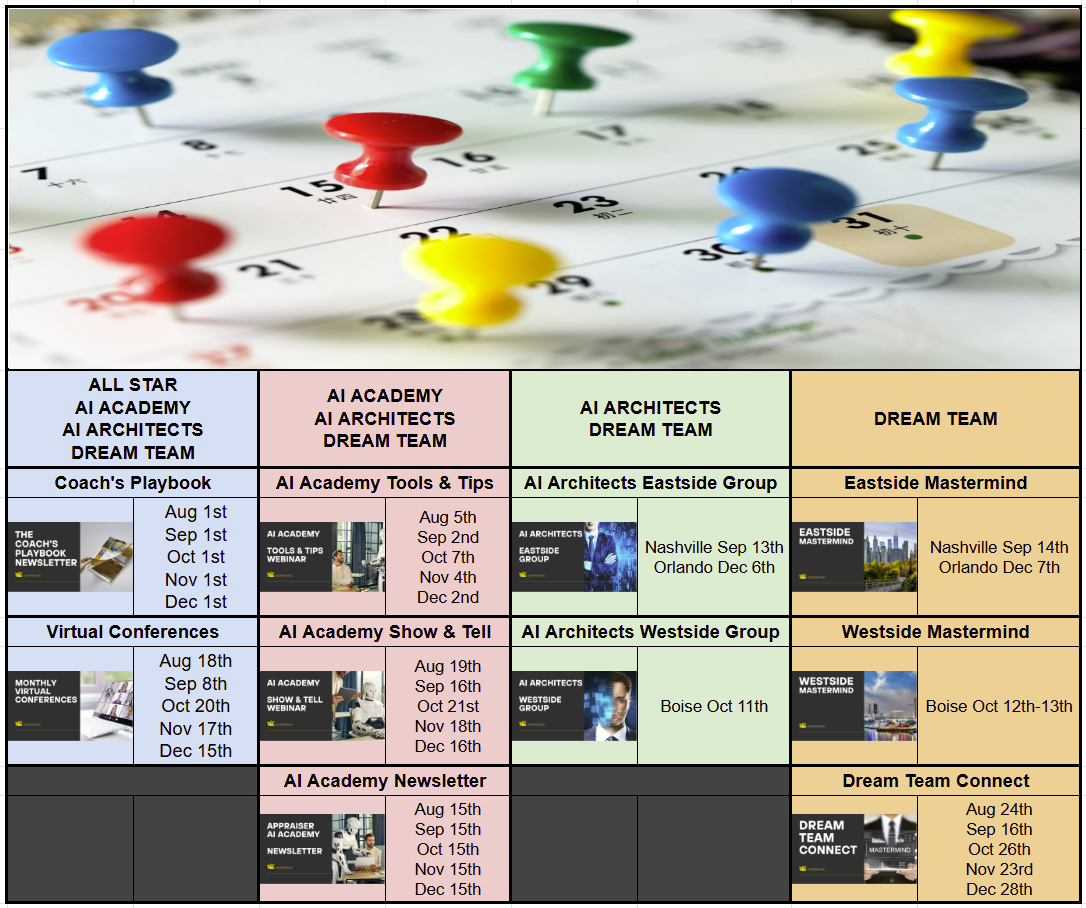
All Virtual Meetings Start at 10:30am MT

Easier to Trace, Cheaper to Run and Now It Clicks the Buttons

Your AI-Written Paragraphs Now Carry an Invisible Signature
What happened: On August 14, Anthropic explained how it is adding a
watermark to the text Claude generates. The pattern is invisible to a
reader, does not change the wording, costs nothing extra, and carries
nothing that identifies you or your firm. Anthropic is doing this to
comply with the EU AI Act, and it is not alone. Roughly 190 companies
signed the EU's Code of Practice on Transparency of AI-Generated
Content in July, and the marking requirement took effect August 2.
Other major developers are building their own versions right now.
Why it matters to appraisers: whether a paragraph came out of a model
is quietly turning into a checkable fact instead of a guess. That does
not make AI-assisted writing wrong, and Anthropic is clear that a
watermark says nothing about ownership or who is responsible for the
work. It does mean you want to be able to answer the question if
someone asks. Know what you used, verify every word before it lands in
a report, and confirm your own client requirements and applicable
standards on disclosure. Worth knowing: a light proofread of your own
writing barely registers, while a full draft written by the model
registers plainly.

ChatGPT Just Became Free Forever, With No Message Cap
What happened: On August 6, OpenAI removed the limit on text
conversations for every ChatGPT user, including the free tier. GPT-5.6
Luna became the default model for Free and Go users, replacing
GPT-5.5, and both tiers picked up a "Think" button that pushes a
harder question through more reasoning before answering. Separate
limits still apply to files, images, voice, and image generation. The
announcement landed shortly after OpenAI said ChatGPT crossed a
billion weekly users.
Why it matters to appraisers: cost is no longer a reason your office
manager, your trainee, or your inspector is not using AI. Put them on
the free tier this month and see what comes back. Two cautions, and
they are real ones. Free accounts do not carry the same data handling
as a paid business or enterprise account, so keep client, borrower,
and assignment material out of them until you have read the settings
and checked what your clients require. And the unlimited part is text
chat, not document uploads, which is where most of the actual
appraisal work lives.

Claude Can Now Work Inside the Websites You Are Already Logged Into
What happened: Anthropic moved Claude in Chrome out of pilot on
August 26 and made it generally available on every paid Claude plan.
The extension reads the page you are signed in to, then clicks, types,
navigates, and fills forms using your existing logins. It can now
approve its own low-risk steps, with a separate safety check reviewing
each action against what you asked for before it runs. You can switch
that off and approve every step yourself. Chrome only for now, not
other Chromium browsers and not mobile.
Why it matters to appraisers: most of what eats your day sits behind a
login with no export button. Your MLS. The county assessor. The
recorder. The AMC portal. The flood map. This is the first mainstream
tool built to work inside those pages instead of asking you to copy
everything out by hand. It is also this month's Blueprint, so keep
reading. One caution up front: hidden instructions on a web page can
try to redirect an AI agent, Anthropic publishes its own attack
testing on that, and the practical answer is to start on sites you
trust and read what it did before you trust what it says.

Stop Copying Data Out of Your MLS by Hand

Claude in Chrome: An Assistant That Can Read the Page You Are Already On
Every appraiser has a version of this problem. The information you
need is sitting on a screen in front of you, behind a login, in a tool
that will not export what you want in the shape you want it. So you
scroll, you read, you retype. Claude in Chrome is a browser extension
that sits in a side panel and reads that page with you. You ask it a
question about what is on the screen and it answers from what is
actually there.
At the August Academy Show and Tell, Drew McDonald showed exactly
this. He had a search return 273 comparable sales and no realistic way
to read all of them. He asked Claude, inside his MLS, to go through
the list and flag which ones mentioned solar. That is the whole idea.
Not replacing your judgment, just reading faster than you can.
BEST FOR: Pulling information out of the web tools you are already
logged into, without exporting, retyping, or scrolling through
hundreds of records.
TIME SAVED: Varies by workflow. First-use setup runs about 15 minutes.
Recurring savings depend entirely on how much manual lookup and
retyping your process has in it today.
DIFFICULTY: Beginner

Run One Read-Only Lookup Before You Trust It With Anything Else
You need a paid Claude plan, which starts at $20 a month, and the
Chrome browser. Install the Claude extension from the Chrome Web Store
and sign in with your Claude account. Leave the automatic approval
setting OFF for your first week so you see every action before it
happens.
Now open a page you already use. Log in the way you normally would.
Open the Claude side panel and give it one narrow, read-only task.
Something like this:
"Read the current page only. Do not click anything and do not
type anything. List every comparable sale on this page whose
remarks mention solar, a solar lease, or an owned solar system.
Give me the MLS number and the exact sentence you found it in.
If you are not certain about one, say so instead of guessing."
Then do the part that actually matters. Go check its answer against
the page yourself. Every one. You are looking for two things: what it
caught that you would have missed, and what it got wrong or made up.
Both are useful.
A word on privacy and verification. This tool runs on pages that may
hold borrower, client, and assignment information, so start with
public data such as an assessor record or a flood map before you point
it at anything covered by an engagement. Anthropic's own guidance is
to skip banking, credentials, and payment pages entirely. Check your
client requirements and your confidentiality obligations before it
touches an order portal or a client system. And verify everything it
hands you against the source. What it gives you is a lead, not a
finding. You are still the appraiser, and the work product is still
yours.

Recap of the Last Academy Teaching Meeting

On August 19 we held the first Show and Tell in the Appraiser AI
Academy, and Drew McDonald of McDonald Appraisals near Kansas City
walked the group through the AI running his office end to end. He
started at the front of the pipeline. He had Claude read his
historical fees and assignment complexities out of his Monday board,
then built a quoting tool that his mother and his trainee can run
without knowing anything about AI. Next came FERB, his front end
review buddy, which takes in the engagement letter, the order form,
title documents and the sales contract, then returns the client, the
due date, the template to use, and the stop checks and required items,
routed to either the inspector or the appraiser. Roadblocks fire into
Slack automatically. He also demonstrated a regression tool he is
rebuilding to replace Synapse and was candid that it is only about 20
percent finished. Before any of it, he built the security. Enterprise
accounts first, then tools.

Andrew asked about something most of us have felt without naming it.
When a session runs long, the answers get worse. Dustin's answer was
to stop it. Hit the stop button, tell the model it is going down the
wrong path, and back up. His words were to get out of the trees and
look at the forest for a second, then restate the simple thing you
actually asked for. He compared it to working with a very smart
assistant you have never met in person. You do not fire them. You say
whoa, that is not what I asked, and you point them again. Drew added
his own rule from the build side: break the thing at least five times
before you roll it out to your team.

The full recording is available in the Appraiser AI Academy

What the Appraiser AI Architects Are Building This Month

The Tool We Build Together in Nashville: A Comp Selection and
Adjustment Teardown
Most of the time a reviewer or an opposing attorney takes your report
apart, the argument is not that your value is wrong. It is that your
support is thin. On September 13 in Nashville, the Architects group
builds a tool whose only job is to attack that first, before anyone
else gets the chance. You feed it your grid and it goes after the
things that actually lose arguments. Comps bracketed on the wrong
parcel size, when price per acre falls as acreage rises. Unusable or
encumbered land averaged in at dry ground value. Road frontage, water,
utilities. And every adjustment that is asserted rather than
supported. Dustin builds and tests it first, then the room builds it
together so each person leaves owning a working version. Not a demo on
a screen. Your laptop, your tool.
This is what a Sunday with the Architects looks like. Real builds, real problems solved. If you're in the Academy and want access to the workflow and prompt files, it's time to consider Upgrading

Your Monthly Challenge — Small & Doable — Feeds the Next Month's Show & Tell

Point AI at One Website You Already Pay For
Pick one lookup you do by hand every single week inside a site you are
already logged into. Screening comps for a feature buried in the
remarks. Pulling a legal description off the county site. Checking a
flood zone. Install Claude in Chrome, open that page, and give it the
read-only prompt from Section 02, reworded to fit your task. Time
yourself doing it the old way once and the new way once. Then check
its answer against the page yourself, line by line, and write down
what it got wrong. The errors are the point. That gap tells you which
parts of your day are safe to hand off and which ones are not.

Post your before-and-after in the AI Academy Forum on the Appraiser Coach Community and tag it #PunchList. The most interesting submissions get featured in next month's newsletter — and Dustin reads every single one.

